🔬 Lab 3 Memory#
📌 Objectives#
Students should be able to write assembly code to access memory using the LDR and STR instructions.
Students should be able to find values stored in registers and memory space using the CCS debugging tools.
Note
Always code as if the guy who ends up maintaining your code will be a violent psychopath who knows where you live.
Tip
START EARLY! You only need to write 10 - 15 lines of assembly code, but it may take much longer than you expect. Start early and seek EI if needed!
📜 Synopsis#
In this lab, you will write an Assembly program determining whether given integers are prime or composite. A prime number is a positive integer that is divisible by only 1 and itself. The equivalent C program is provided in Lab03_PrimeMain.c in the Lab03_PrimeNumbers project.
The array of numbers to test is {1, 2, 7, 10, 15, 62, 97, 282, 408, 467, 967, 6687, 25913, 25481, 118061, 0}. The number 0 at the end of the array is to indicate the end of array. The result array should be {-1, 1, 1, -1, -1, -1, 1, -1, -1, 1, 1, -1, 1, -1, 1, x}, where 1 denotes prime, -1 denotes composite, and x denotes don't care.
An integer \(n\) is not divisible by a number \(m\) if \(n/2 < m < n\). For example, 15 is not divisible by any number between 7.5 and 15 (i.e. 15 is not divisible by 8, 9, … , or 14). So, you don’t have to check if 15 is divisible by these numbers. That’s why the following for loop in Lab03_PrimeMain.c only goes checks to see if a number \(n\) is divisible by 2, 3, 4, … , or \(m\) (with \(m = n/2\)) :
for (int i = 2; i <= m; i++) // m is n/2
💻 Procedure#
Setup#
Connect the LaunchPad to your computer via the provided USB cable.
Open Code Composer Studio (CCS) and select your workspace.
Ensure your Project Explorer is open on the left of the CCS screen. Otherwise, select View > Project Explorer.
Open the
Lab03_PrimeNumbersproject by double-clicking it.
Run main.c#
Right-click on
Lab03_PrimeMain.cin theLab03_PrimeNumbersproject and ensureExclude from BuildIS NOT checked.Right-click on
Lab03_Prime.asmin theLab03_PrimeNumbersproject and ensureExclude from BuildIS checked.Open
Lab03_PrimeMain.cand carefully read the code.Click the
Debugicon on the main toolbar.Click on the
Resumeicon (F8) followed by theSuspendicon (Alt+F8). The program will stop atwhile(1);Observe the values of the
Resarray in theExpressionstab. You may need to click on>next toResto expand the array into individual variables. Note: If theResarray is not visible on theExpressionstab, clickAdd new expressionand typeResinto the text box.Take a screenshot of the contents of
Resafter execution of the code. Note: The contents of theResarray should match the values shown in the results array in the Synopsis sectionPress the
Terminateicon to leaveDebugmode.
Warning
Please take a screenshot of the region of interest and ensure that it is legible. If your instructor has trouble reading it, you might not get full credit.
Attention
You will receive a grade of -10 points if you submit a picture of a computer screen taken by your phone or mobile device.
Complete Lab03_Prime.asm#
Tip
Before you start writing code, carefully read both Lab03_PrimeMain.c and Lab03_Prime.asm and the comments in them.
Right-click on
Lab03_PrimeMain.cin theLab03_PrimeNumbersproject and ensureExclude from BuildIS checked.Right-click on
Lab03_Prime.asmin theLab03_PrimeNumbersproject and ensureExclude from BuildIS NOT checked.
Modulo
For the modulo operation, use the assembly code provided below.
UDIV R8, R0, R6 ; R8 = R0/R6 (n/i)
MUL  R9, R8, R6 ; R9 = int(n/i) * i
CMP  R0, R9     ; n == int(n/i) * i ?,  n is divisible by i if R0 == R9.
Add your code to Lab03_Prime.asm
Use
Lab03_PrimeMain.cas a reference to complete the assembly code. Please read all the comments before writing any code.It is important to comment your code. You must add a comment to every line for this assignment.
Verify contents of Result array
Once your assembly code is complete, click the
Debugicon.Click on the
Resumeicon (F8 or green arrow) followed by theSuspendicon (Alt+F8 or yellow pause icon). The program will stop atStall B Stall.Search for the contents of
Resultarray using theMemory Browser. You will need to do the following:Type
ResAddrinto theMemory Browsersearch bar to show the contents ofResAddr(which is the address to theResultarray).Type the address saved in
ResAddrinto theMemory Browsersearch bar (e.g. 0x2000000A).Change the encoding style (number format) to 8-bit Signed Int using the drop-down box
You should see something similar to the figure below. If you hover over the numbers in the Memory Browser, you will see the memory address for that specific 8-bit value. Start at first address for the Result array (e.g. 0x2000000A) and verify the contents of the array match the values shown in the results array in the Synopsis section.
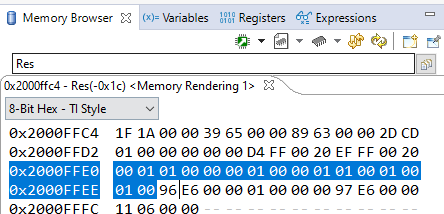
Fig. 1 Memory Browser with 8-Bit Signed Int encoding style.#
If you select a wrong encoding style as shown below, you will not be able to correctly read the values inside
Result.
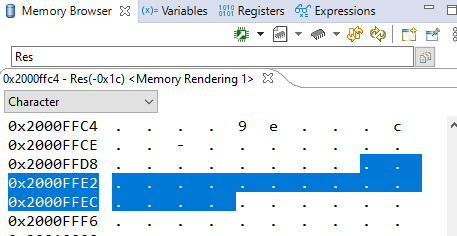
Fig. 2 Memory Browser with Character encoding style.#
Tip
There are many assembly examples in CCS if you are looking for assembly syntax. For example, take a look at Example04_ArrayAdd for LDR, LDRB, STRB, loops, etc.
Note
ASR is a shift operator, which is the same as >> in C. If you right shift a number by 1, it is the same as dividing by 2. For example, b1000 (8) >> 1 = b0100 (4).
Tip
If you divide 7 by 2, the answer is 3, not 3.5 in C. If you divide 7.0 by 2, the answer is 3.5.
float y = 7/2;   // y is 3.0, integer division (3) followed by type casting w/ float
float y = 7.0/2; // y is 3.5
int y = 7.0/2;   // y is 3, floating division (3.5) followed by type casting w/ int
🚚 Deliverables#
Deliverable 1#
[4 pts] Run
Lab03_PrimeMain.cin theLab03_PrimeNumbersproject and take a screenshot showing the contents ofResafter the execution of the code. You must expand the array to show the individual values in the array.
Deliverable 2#
[7.5 pts] Complete
Lab03_Prime.asmand add a comment to every line of your code. Push your code to your repository. It is your responsibility to check your files have been successfully pushed to your GitHub repository.
Warning
Your code must be compilable. If your code throws any compile errors, you will get a grade of 0 for Deliverable 2.
Deliverable 3#
[4 pts] Provide screenshots showing the addresses of
ResultandNums, stored in RAM/ROM (use the Memory Browser and the pointers you created).
Deliverable 4#
[4 pts] Provide a screenshot showing the contents of
Result, stored in memory after execution of the code (use the Memory Browser and change the format to 8-Bit Signed Int).[-10 pts] Take pictures of your screen with a mobile device or digital camera and submit them on Gradescope. Yes, I am serious…