Lesson 16 - Computer Memory#
Lesson Outcomes#
By the end of this lesson, you should be able to:
Explain the physical implementation of computer memory.
Differentiate between Dynamic Random Access Memory (DRAM), Static Random Access Memory (SRAM), and Read-Only Memory (ROM).
Apply fundamental concepts of assembly language and machine code.
Calculate Program Counter (PC), Instruction Register (IR), Accumulator, and Random Access Memory (RAM) address values during the fetch–decode–execute cycle.
Von Neumann Architecture and the Stored-Program Concept#

The Von Neumann Architecture is the foundational design model for most modern digital computers. Proposed in the mid-20th century, it introduced a revolutionary idea known as the stored-program concept, which fundamentally changed how computers operate.
At its core, the Von Neumann model organizes a computer into four primary components:
Input
Processor (Central Processing Unit, CPU)
Memory
Output
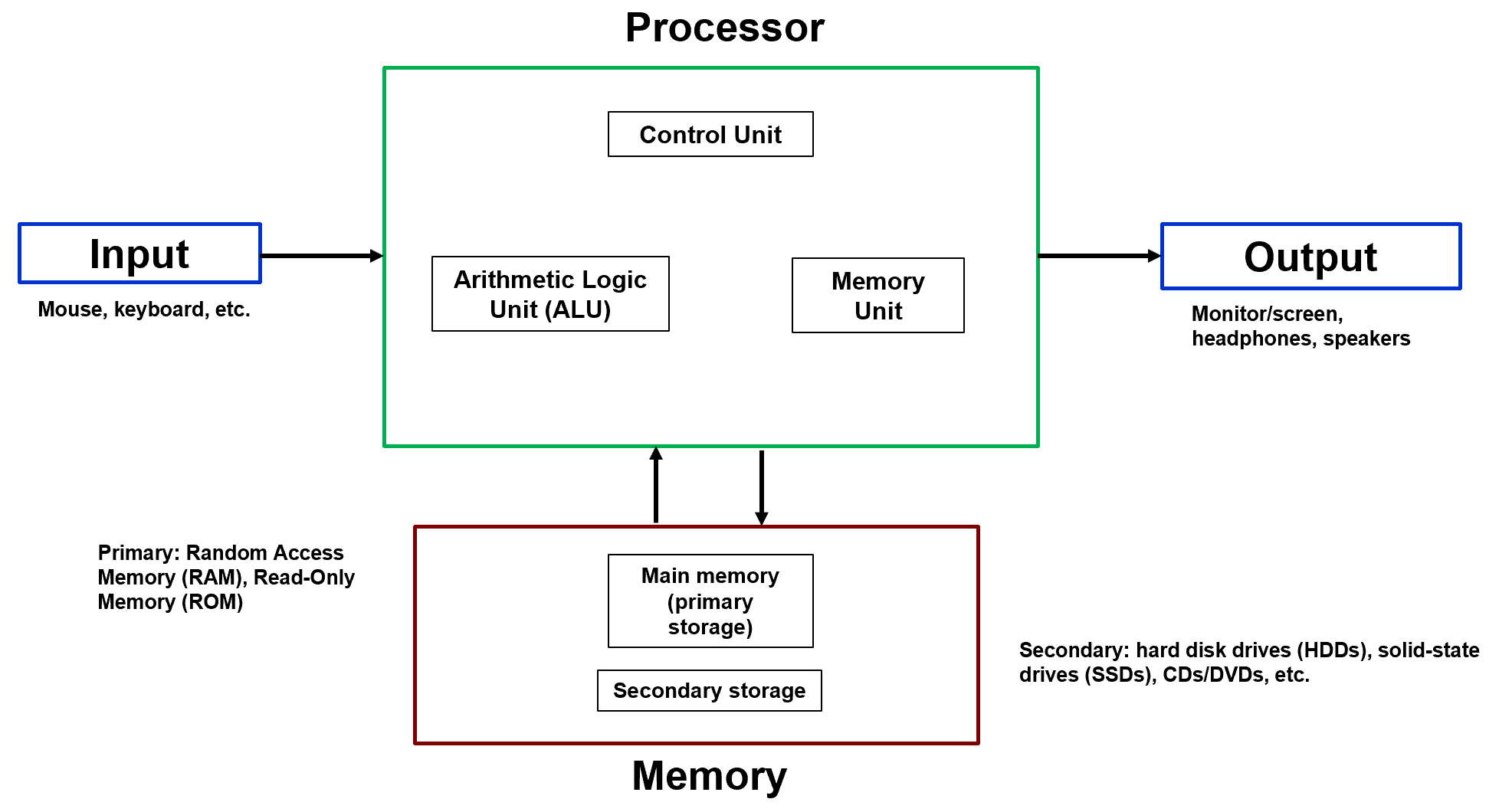
These components are clearly illustrated in Figure 1.
Major Components of the Von Neumann Architecture#
1. Input#
Input devices provide data and instructions to the computer system.
Examples:
Mouse
Keyboard
Other human interface devices
Input sends information into the processor, where it can be manipulated and processed.
2. Processor (CPU)#
The processor is the central computational engine of the system. As shown in the figure, it contains three primary subcomponents:
Control Unit (CU)
Arithmetic Logic Unit (ALU)
Memory Unit (internal registers/cache)
Control Unit (CU)#
The Control Unit directs the operation of the processor. It:
Fetches instructions from memory
Decodes them
Issues control signals to execute operations
The CU determines what action is performed.
Arithmetic Logic Unit (ALU)#
The ALU performs:
Arithmetic operations (addition, subtraction, multiplication, division)
Logical operations (AND, OR, NOT, comparisons)
The ALU performs how the computation is executed.
Memory Unit (Inside the Processor)#
The internal memory unit consists of high-speed storage elements such as:
Registers
Cache
These store temporary data and intermediate results during execution.
3. Memory#
In the Von Neumann Architecture, memory stores both data and instructions in the same physical memory system. This is the defining feature of the stored-program concept.
Memory is divided into:
Primary Storage (Main Memory)#
Random Access Memory (RAM)
Read-Only Memory (ROM)
Primary memory holds:
The currently executing program
Active data
Secondary Storage#
Hard Disk Drives (HDDs)
Solid-State Drives (SSDs)
CDs/DVDs
Other non-volatile storage
Secondary storage holds:
Long-term data
Programs not currently executing
Examples of Programs in Primary and Secondary Storage#
Primary Storage (RAM)#
Primary storage, or Random Access Memory (RAM), holds programs and data that are actively being used by the computer. Because RAM has very fast access times, it enables smooth, real-time operation.
Examples of programs and data stored in RAM:
A PowerPoint presentation that is currently open and running
A YouTube video you are watching (both the visual frames and audio data are temporarily stored in RAM while playing)
A web browser with multiple open tabs
These applications must reside in RAM so the processor can quickly read and write data as the program executes.
Secondary Storage (DVD)#
Secondary storage devices, such as a DVD, store data long-term but have significantly slower access times compared to RAM.
For example, when using a DVD player, you may notice that a movie does not start immediately after inserting the disc. The DVD player must first read data from the disc and load the necessary information into memory before playback can begin. This loading delay occurs because secondary storage devices are mechanically and electronically slower than RAM.
Access Time Comparison#
Primary storage (RAM): Very fast access time; data can be retrieved almost instantly.
Secondary storage (DVD): Much slower access time; noticeable delay while data is read and loaded.
In general, primary storage is optimized for speed, while secondary storage is optimized for long-term capacity and persistence.
4. Output#
Output devices present results to the user.
Examples:
Monitor/screen
Headphones
Speakers
Output represents the final result of processing operations performed by the CPU.
The Stored-Program Concept#
The most important contribution of the Von Neumann Architecture is the stored-program concept.
Definition#
The stored-program concept states that:
Instructions (program code) and data are stored together in the same memory and are treated identically by the processor.
This means:
A program is simply data stored in memory.
Instructions can be fetched from memory just like numeric data.
The processor executes instructions sequentially unless directed otherwise.
Why This Architecture Was Revolutionary#
Before the stored-program concept, many early machines:
Hardwired instructions
Required physical rewiring to change programs
The Von Neumann model allowed:
Programs to be loaded from memory
Software updates without hardware changes
Conditional branching and looping
General-purpose computing
This flexibility is what enables modern computing systems.
Key Characteristics of Von Neumann Architecture#
Single shared memory for data and instructions
Single shared data path (bus) between CPU and memory
Sequential instruction execution by default
Centralized control via the Control Unit
The Von Neumann Bottleneck#
Because instructions and data share the same memory and communication pathway, only one transfer can occur at a time. This limitation is known as the:
Von Neumann Bottleneck
It constrains system performance because the CPU must wait for memory transfers.
Memory as an Array#
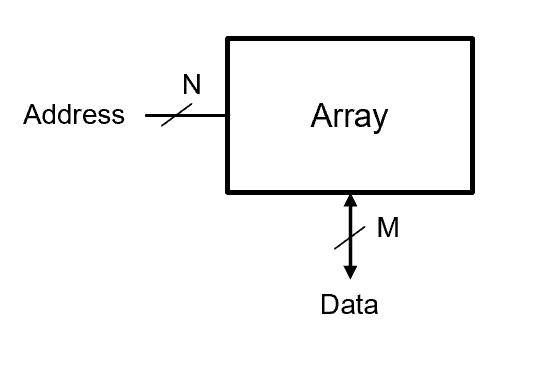
Computer memory can be modeled as an array of storage locations. Each location is selected by an address and contains a data value.
Address and Data Interfaces#
Address (N bits):
Each memory location has a unique address.
The N-bit address input selects which location in the array we want to access.
Data (M bits):
The M-bit data path allows reading from or writing to the selected address.

How it works:
On the left, the N-bit address line enters the array.
The array stores the data at that location.
On the bottom, the M-bit data line carries the information read from or written to that location.
2D Memory Arrays and Bit Cells#
At the lowest physical level, digital memory is built from extremely small storage elements called bit cells.
A bit cell stores exactly one bit of information:
Logic 0
Logic 1
In physical hardware, this may be implemented using transistors and capacitors, but logically it behaves as a two-state device.
To build useful memory systems, these individual bit cells are organized into a structured layout called a 2D memory array.
The 2D Grid Organization#
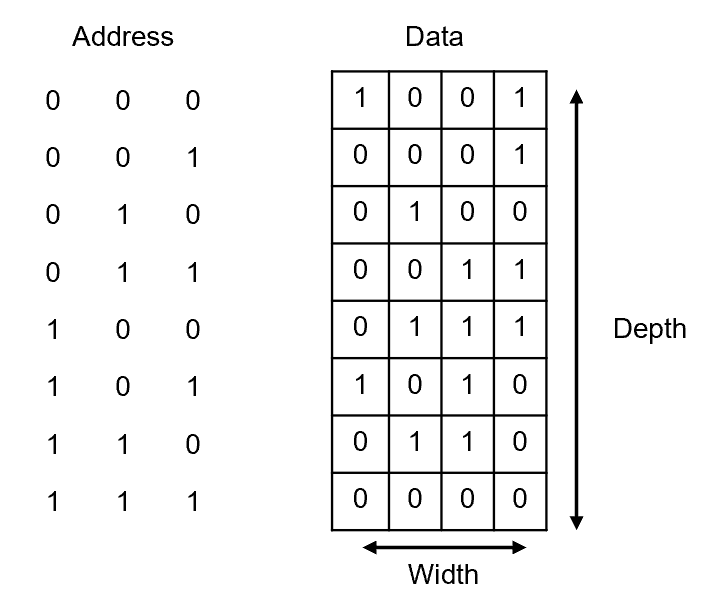
A memory array is arranged as a rectangular grid:
Rows represent selectable memory locations.
Columns represent the bits within each location.
This organization allows hardware to efficiently select one complete data word at a time.
We describe this structure using two primary dimensions:
Depth → the number of rows
Width → the number of columns
Visually, you can think of memory as a spreadsheet:
Each row is one memory location.
Each column is one bit position within that location.

Address Lines and Data Lines#
The size of the array is controlled by two independent hardware interfaces:
Address Lines (N bits)#
The number of address bits determines how many rows (words) can be selected.
If there are \(N\) address bits, then:
Each unique binary address selects one row in the array.
For example:
The address lines do not carry data — they only select which row becomes active.
Data Lines (M bits)#
The number of data bits determines how many bits are read or written simultaneously.
If there are \(M\) data lines, then:
Each selected row outputs or receives exactly \(M\) bits at once.
For example:
Key Terms#
Let’s formalize the terminology used in memory systems.
Word#
A word is the group of bits read from or written to memory at the same time.
If a memory has:
Then each word contains 8 bits.
Depth#
Depth is the total number of addressable words in memory.
If there are \(N\) address bits:
Depth determines how many different memory locations exist.
Width#
Width is the number of bits in each word.
Width determines how much data is stored in each location.
Array Size#
The total memory capacity (in bits) is:
Substituting:
This represents the total number of stored bits in the memory array.
Conceptual Example#

Suppose:
Then:
This means the memory contains:
8 rows
4 columns
32 total stored bits
Why the 2D Structure Matters#
The 2D organization is not arbitrary — it enables:
Efficient decoding of address signals
Simultaneous access to multiple bits
Scalable memory design
Practical semiconductor layout
Every modern RAM chip — whether DRAM or SRAM — ultimately follows this same two-dimensional organizational principle.
Understanding this structure is critical before analyzing:
Memory timing
DRAM refresh behavior
Wordline and bitline activation
Assembly-level memory access
This 2D abstraction connects the physical hardware implementation to the logical memory model used in software.
Understanding Memory Storage Locations#
Once a memory array is organized into rows (depth) and columns (width), we can begin to interpret how specific data values are stored and retrieved.
Recall that:
The address selects a row.
The data lines return the bits stored in that row.
Each row corresponds to one word.
Let us apply this understanding to a specific memory array example.

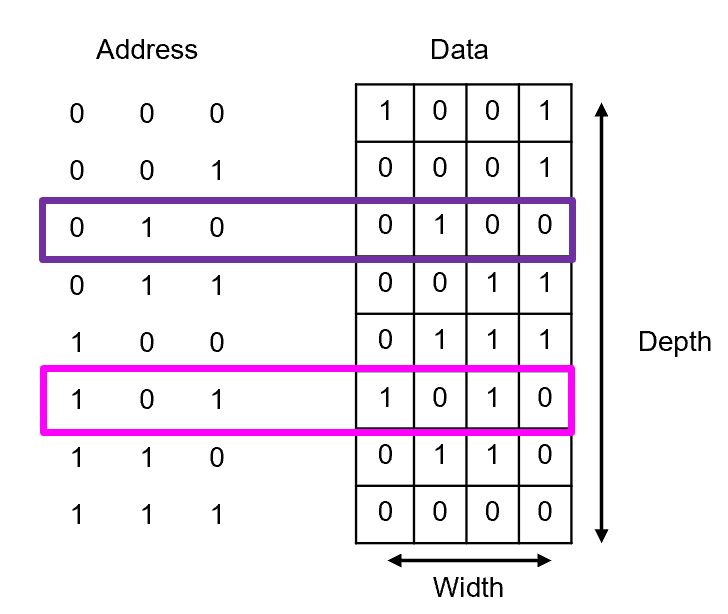
Question 1#
At what address is the data 0100 stored?
To answer this question:
Scan each row of the memory array.
Identify the row containing the exact 4-bit pattern:
\[ 0100 \]Once located, read the binary address associated with that row.
From the array, the data value:
appears in the row with address:
Therefore,
Stored at address: 010

Question 2#
What data is contained at address 101?
This question reverses the process.
Locate the row corresponding to the binary address:
\[ 101 \]Read the 4-bit word stored in that row.
From the array, address:
contains the data:
Therefore,
Data stored: 1010

Conceptual Interpretation#
These exercises reinforce two important principles:
An address does not store data — it selects data.
Each unique address maps to exactly one word in memory.
Mathematically, if the memory has \(N\) address bits, then there are: \(2^N\) distinct storage locations, each containing \(M\) bits.
Understanding this mapping between address → word is essential before moving into:
Program Counter operation
Instruction fetch cycles
Assembly-level memory access
DRAM physical implementation
Memory access always follows the same rule:
The address selects the row.
The row outputs the word.
Memory Array Sizing Practice#

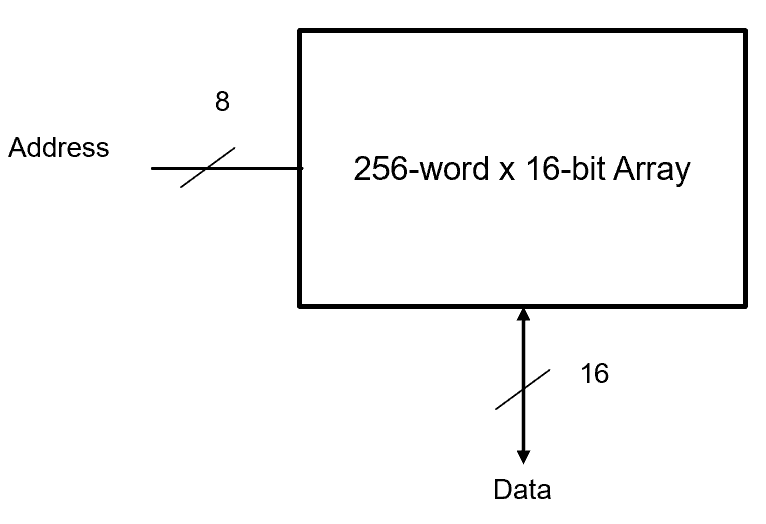
Example: 256-word × 16-bit Array#
A “256-word × 16-bit” memory means:
Depth = 256 words
Width = 16 bits per word
The number of address bits is the number of bits needed to count 256 unique addresses:
So:
Address bits: 8
Data bits: 16
Total size:
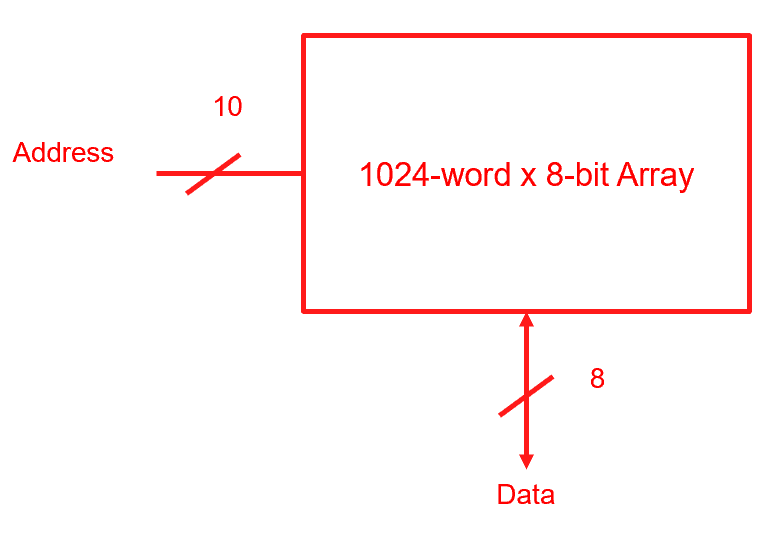
Example: 10 Address Bits, 8 Data Bits#
Consider a memory array that has 10 address bits, and 8 data bits.
Number of words that can be stored:
Size of each word that can be stored:
Total size of memory array:

Memory Bit Cells: Wordlines and Bitlines#
To understand how data is physically stored and accessed in memory, we must look inside the memory array at the level of the bit cell.
A bit cell stores exactly one bit of information:
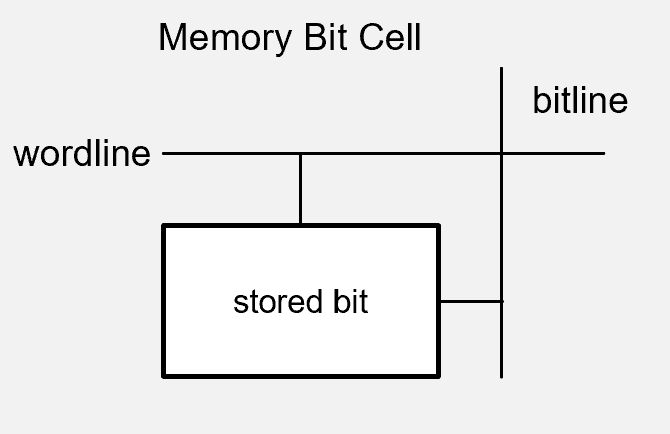
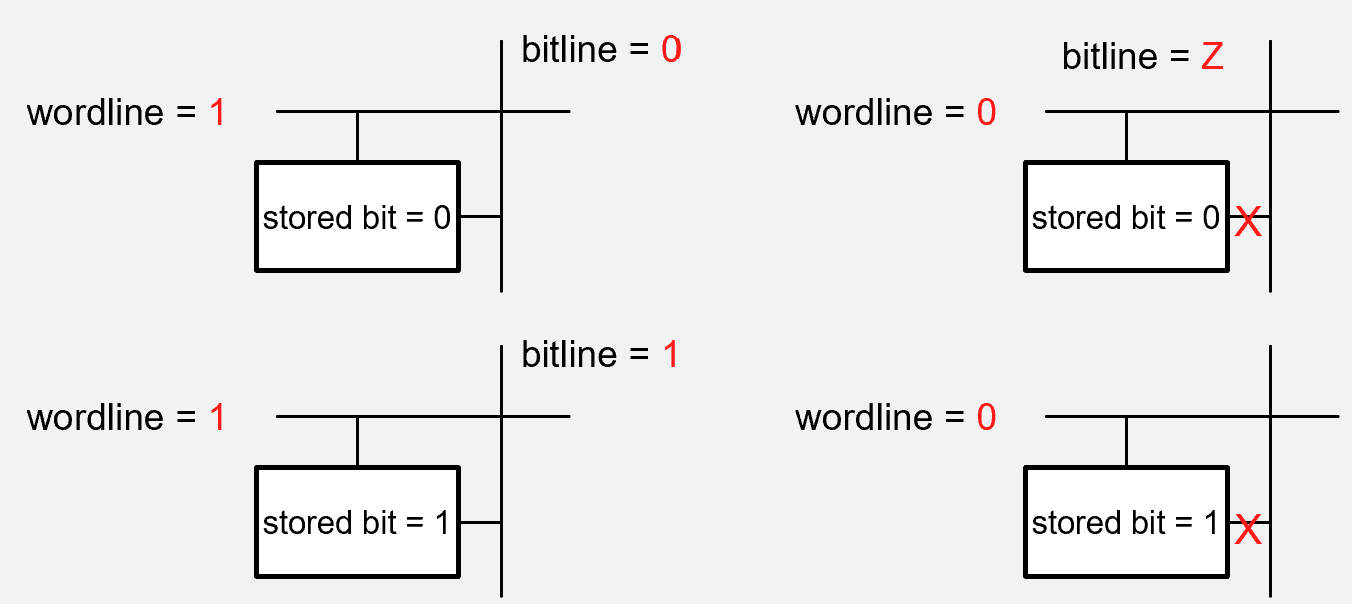
In a 2D memory array, each bit cell sits at the intersection of two critical control lines:
Wordline → selects the row
Bitline → carries the data value
This intersection allows the system to precisely control which individual storage element is being accessed.

The Role of the Wordline#
The wordline is a row-select signal.
When an address is applied to memory, the address decoder activates exactly one wordline corresponding to the selected row.
Wordline = 1 (High Voltage)#
When the wordline is driven HIGH:
The bit cell becomes active.
The internal storage element is electrically connected to the bitline.
The value on the bitline can either:
Be written into the cell, or
Be sensed and read from the cell.
In other words, a HIGH wordline enables access to that row.
Wordline = 0 (Low Voltage)#
When the wordline is LOW:
The bit cell is inactive.
The storage element is electrically isolated from the bitline.
No reading or writing occurs.
The stored value remains unchanged.
A LOW wordline effectively disconnects the cell from the rest of the circuit.
The Role of the Bitline#
While the wordline selects which row is active, the bitline carries the actual data signal.
Depending on the operation:
During a write, the bitline drives a voltage corresponding to:
\[ 0 \text{ (low voltage)} \quad \text{or} \quad 1 \text{ (high voltage)} \]During a read, the stored charge or logic state inside the bit cell influences the voltage on the bitline, which is then detected by sensing circuitry.
Thus:
The wordline controls access
The bitline carries information
Coordinated Operation#
For a single bit cell to be accessed, two conditions must be satisfied:
The correct wordline must be activated.
The corresponding bitline must carry or sense data.
This coordinated control allows memory arrays to scale to millions or billions of bit cells while still enabling precise access to individual bits.

Why This Structure Matters#
The wordline–bitline structure enables:
Efficient row selection through address decoding
Parallel access to multiple bits in a word
Compact semiconductor layout
Scalable memory architectures
Every modern memory technology, whether DRAM or SRAM, uses this same fundamental structure.
Understanding this electrical-level control mechanism is essential before studying:
DRAM charge storage and refresh
SRAM cross-coupled inverter cells
Memory timing diagrams
Instruction fetch behavior at the hardware level
At its core, all digital memory follows the same principle:
The wordline selects the row.
The bitline carries the bit.

Dynamic Random Access Memory (DRAM)#
Dynamic Random Access Memory (DRAM) is the most widely used technology for main memory in modern computers. It is optimized for high density and low cost per bit, making it ideal for large-capacity memory systems.
To understand DRAM, we must examine the structure and behavior of its fundamental building block: the DRAM bit cell.
DRAM Bit Cell Concept#
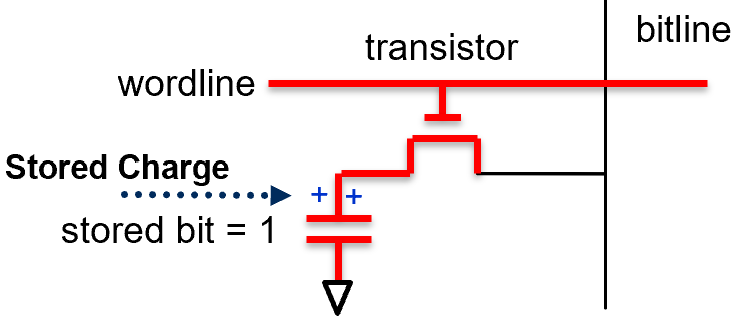
A DRAM bit cell is remarkably simple. It consists of only two components:
Capacitor → stores electrical charge
Transistor → controls access to the capacitor
Because the capacitor stores charge, it represents information using voltage levels:
Charged capacitor → logic \(1\)
Discharged capacitor → logic \(0\)
The transistor acts as an electrically controlled switch. When activated, it connects the capacitor to the bitline so that data can be read or written.
Why Is It Called “Dynamic”?#
DRAM is called dynamic because the stored charge does not remain indefinitely.
There are three important characteristics to understand:
Charge Leakage
The capacitor gradually loses charge over time due to leakage currents. Even if no operation is performed, a stored \(1\) will eventually decay toward \(0\).Refresh Requirement
To preserve data, every DRAM cell must be periodically refreshed (rewritten).
Typical refresh intervals are approximately:\[ 64 \text{ milliseconds} \]Destructive Read
Reading a DRAM cell disturbs or partially discharges the stored charge.
Therefore, after every read operation, the memory controller must restore (rewrite) the original value.
Because of these behaviors, DRAM requires continuous management by external refresh circuitry.
DRAM Process Introduction (1T1C)#
DRAM cells are commonly described as 1T1C devices:
1 Transistor
1 Capacitor
This minimal structure allows DRAM to achieve extremely high storage density compared to SRAM.

Technology Notes#
DRAM is typically built using NMOS transistors.
Each cell is arranged at the intersection of a wordline and a bitline.
The transistor is controlled by the wordline.
The capacitor connects to the bitline through the transistor.
Write Operation#
To store a value in a DRAM cell, the following sequence occurs:
The wordline is set HIGH (1).
The transistor turns ON.
The switch between the capacitor and bitline closes.
A voltage is driven onto the bitline:
HIGH voltage → represents logic \(1\)
LOW voltage → represents logic \(0\)
The capacitor responds:
HIGH voltage → capacitor stores charge → logic \(1\)
LOW voltage → capacitor discharges → logic \(0\)
Once the wordline returns LOW, the transistor turns OFF, isolating the capacitor and trapping the stored charge.

Read Operation#
Reading from DRAM is more subtle.
The wordline is set HIGH (1).
The transistor turns ON.
The capacitor connects to the bitline.
The stored charge redistributes between the capacitor and the bitline.
If the capacitor was charged → the bitline voltage rises slightly.
If the capacitor was empty → the bitline voltage falls slightly.
A sense amplifier detects this small voltage change and interprets it as:
Logic \(1\)
Logic \(0\)
Because charge is shared during this process, the capacitor loses some of its stored energy. Therefore:
Every read must be followed by a rewrite (refresh) of the same value.
Why DRAM Is Used for Main Memory#
Despite requiring refresh and having slower access times than SRAM, DRAM offers key advantages:
Very small cell size (1T1C)
High storage density
Low cost per bit
Scalable to large capacities
These properties make DRAM ideal for:
System RAM in laptops and desktops
Server memory
Game consoles
Embedded systems requiring large memory pools
Conceptual Summary#
At its core, DRAM operates on a simple principle:
Store information as electrical charge.
Use a transistor to control access.
Periodically refresh to maintain correctness.
Although electrically simple, the management of millions or billions of DRAM cells requires sophisticated memory controllers.
Understanding DRAM at the bit-cell level provides the foundation for analyzing:
Memory timing
Refresh cycles
Performance constraints
The Von Neumann memory bottleneck
DRAM vs SRAM vs ROM#
Feature |
DRAM (Dynamic RAM) |
SRAM (Static RAM) |
ROM (Read-Only Memory) |
|---|---|---|---|
Volatility |
Volatile (data lost when power off) |
Non-volatile (data retained) |
Refresh Needed |
Yes – capacitor charge leaks and must be refreshed |
No refresh needed |
Not applicable |
Speed |
Slower than SRAM |
Very fast |
Slower than DRAM/SRAM |
Cell Design |
1 transistor + 1 capacitor (1T1C) |
Multiple transistors (cross-coupled inverters) |
Transistors designed for fixed storage |
Density / Capacity |
High capacity |
Lower capacity |
Varies (depends on design) |
Cost |
Cheaper to manufacture |
More expensive |
Moderate |
Main Uses |
Main memory in computers and game consoles |
Processor cache, networking devices, automotive systems |
Firmware, BIOS, microcontrollers, USB drives, digital cameras |
Assembly Language and Machine Code#
At the lowest level, a computer does not understand English words, high-level programming languages, or abstract algorithms. It understands only patterns of electrical signals representing binary values:
These binary patterns encode both instructions and data. To understand how programs execute, we must distinguish between machine code and assembly language, and understand the role of registers and processor architecture.
Machine Code#
Machine code is the native language of the processor.
It consists entirely of binary instructions:
Sequences of 0s and 1s
Directly executed by the hardware
Stored in memory just like data
For example, a machine instruction might internally look like:
Each group of bits has meaning according to the processor’s design:
Some bits specify the operation (opcode).
Some bits specify registers.
Some bits specify memory addresses.
Because long binary sequences are difficult for humans to read, machine code is often represented in hexadecimal form. Since:
hexadecimal provides a compact and readable shorthand for binary instructions.
However, even hexadecimal remains cumbersome for programming large systems.
Assembly Language#
To make programming more manageable, engineers developed assembly language.
Assembly language is a human-readable representation of machine code. Instead of writing raw binary, programmers use short textual mnemonics to represent operations.
Examples of common mnemonics:
MUL→ multiplyADD→ addSTORE→ store valueJMP→ jump to another instruction
An assembly instruction might look like: ADD 5
This tells the processor to add the value located at address 5 to the current working value (often stored in the accumulator).
Each assembly instruction corresponds directly to a specific machine-code instruction. An assembler translates assembly language into binary machine code before execution.
Registers#
Inside the Central Processing Unit (CPU) are extremely small, high-speed storage elements called registers.
Registers serve as temporary holding locations during instruction execution. They are used to store:
Data values
Memory addresses
Intermediate computation results
Control information
Examples of common registers include:
Program Counter (PC) → holds the address of the next instruction
Instruction Register (IR) → holds the current instruction
Accumulator → stores arithmetic or logical results
Registers operate much faster than main memory, which is why processors use them extensively during the fetch–decode–execute cycle.
Conceptually:
Memory holds programs and data.
Registers hold the values currently being operated on.
Processor Architectures#
Not all processors interpret instructions the same way.
Each processor family defines its own:
Instruction set
Register structure
Encoding format
Assembly language syntax
This definition is known as the Instruction Set Architecture (ISA).
Examples of common architectures:
Intel x86 → used in most desktop and laptop computers
ARM → widely used in mobile devices and embedded systems
MIPS → commonly used in academic settings and certain embedded applications
Because each architecture has a unique instruction set, assembly code written for one architecture cannot run directly on another without modification or translation.
Conceptual Summary#
The relationship between abstraction levels can be summarized as follows:
High-level language (C, Python, etc.)
Human-friendly
Portable
Assembly language
Architecture-specific
Symbolic representation of machine instructions
Machine code
Binary instructions
Directly executed by hardware
Understanding this layered structure is essential before analyzing:
The fetch–decode–execute cycle
Program Counter behavior
Memory addressing
Instruction execution timing
At its core, every program ultimately becomes binary patterns executed by the processor.
Fetch–Decode–Execute Cycle#
At the heart of every processor is a simple but powerful repetition mechanism known as the fetch–decode–execute cycle. This cycle describes how the Central Processing Unit (CPU) reads instructions from memory and performs operations.
Because of the stored-program concept, both instructions and data reside in memory. The CPU therefore repeatedly performs the same three fundamental steps for every instruction.
Step 1: Fetch#
In the fetch phase:
The CPU uses the Program Counter (PC) to determine the address of the next instruction.
That instruction is retrieved from memory.
The instruction is placed into the Instruction Register (IR).
Conceptually:
After fetching, the Program Counter typically increments:
This prepares the processor to fetch the next sequential instruction, unless a branch or jump changes the PC.
Step 2: Decode#
In the decode phase:
The Control Unit examines the contents of the Instruction Register.
It determines what operation must be performed.
It identifies which registers or memory locations are involved.
The processor translates the binary opcode into control signals that drive internal hardware components.
Step 3: Execute#
In the execute phase:
The processor performs the specified operation.
This may involve:
Arithmetic computation
Logical comparison
Data movement
Branching to a new instruction address
Examples of execution actions include:
Adding two values
Storing a result in memory
Updating the Program Counter
Setting status flags
After execution completes, the cycle begins again with the next fetch.
Key CPU Components#
Several specialized hardware elements support the fetch–decode–execute process.
Program Counter (PC)#
The Program Counter holds the memory address of the next instruction to be executed.
It serves as the processor’s “place marker” within the program.
Sequential execution → PC increments by 1
Branch instruction → PC is set to a new address
Instruction Register (IR)#
The Instruction Register stores the current instruction being decoded and executed.
Once an instruction is fetched:
The Control Unit reads the IR to determine the required action.
Accumulator#
The Accumulator is a working register used to store intermediate results of arithmetic and logical operations.
For example:
ADD
SUBTRACT
AND
OR
NOT
A typical operation may look conceptually like:
The accumulator simplifies processor design by centralizing arithmetic operations into a primary working register.
Common Assembly Instructions#
The following table summarizes several common assembly instructions used in simplified processor models:
Instruction |
Description |
|---|---|
LOAD X |
Load value in address X into the accumulator. |
STORE X |
Store value from the accumulator into address X. |
ADD X |
Add value X to the value in the accumulator. |
SUB X |
Subtract value in address X from the value in the accumulator. |
MUL X |
Multiple value X to the value in the accumulator. |
DIV X |
Divide value in address X from the value in the accumulator. |
CMP X, Y |
Compare value in address X to value in address Y. |
JG Z |
Jump to address Z if X > Y; program counter = Z. |
JL Z |
Jump to address Z if X < Y; program counter = Z. |
JGE Z |
Jump to address Z if X > Y; program counter = Z. |
JLE Z |
Jump to address Z if X < Y; program counter = Z. |
These instructions illustrate the primary categories of processor operations:
Data movement (LOAD, STORE)
Arithmetic operations (ADD, SUB, MUL, DIV)
Logical comparison (CMP)
Control flow changes (JG, JL, JGE, JLE)
Conceptual Summary#
The fetch–decode–execute cycle is the operational heartbeat of the processor.
Each instruction follows this sequence:
Fetch from memory
Decode the operation
Execute the instruction
Then repeat.
Understanding this cycle is essential before analyzing:
Program Counter updates
Branching and looping behavior
Instruction timing
Memory access patterns
Every high-level program ultimately reduces to repeated iterations of this simple three-step process.
Example 1 — Sum of 2 Numbers#
This example demonstrates how a simple program executes using the fetch–decode–execute cycle. The objective of the program is straightforward:
Add two numbers stored in memory and store the result back into memory.
Although the task is simple, it illustrates how instructions, registers, and memory interact at the hardware level.
Initial RAM#
The memory is organized as follows:
Address |
Value |
|---|---|
0 |
LOAD 4 |
1 |
ADD 5 |
2 |
STORE 6 |
3 |
0 |
4 |
2 |
5 |
7 |
6 |
0 |
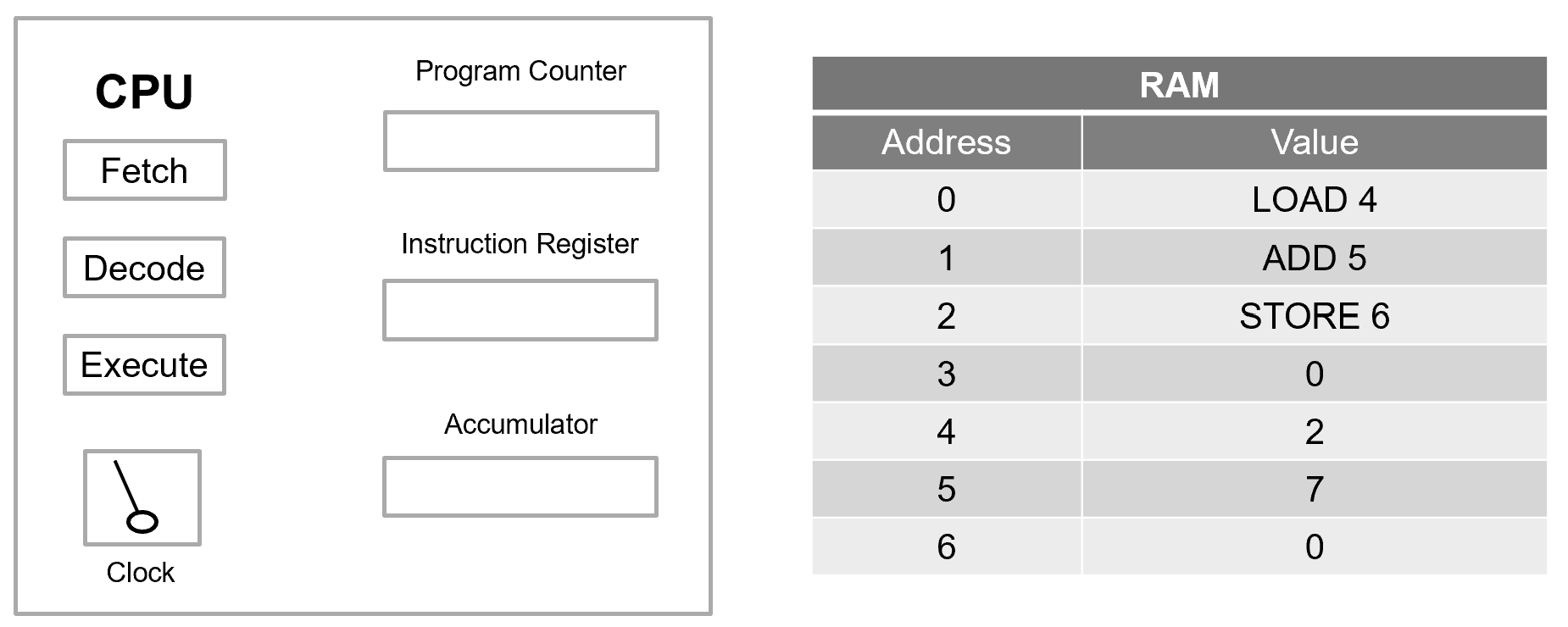
Interpreting the Memory Layout#
Addresses 0–2 contain instructions:
LOAD 4→ Load the value stored at address 4 into the accumulator.ADD 5→ Add the value stored at address 5 to the accumulator.STORE 6→ Store the accumulator’s result into address 6.
Addresses 3–6 contain data values:
Address 4 contains: \(2\)
Address 5 contains: \(7\)
Address 6 contains: \(0\) (initially empty)
The Program Counter (PC) begins at address 0.
Step-by-Step Execution#
Step 1: LOAD 4#
Fetch
The instruction at address 0 is fetched into the Instruction Register.
Decode
The Control Unit interprets LOAD 4.
Execute
The value stored at address 4 is loaded into the accumulator:
The Program Counter increments to 1.
Step 2: ADD 5#
Fetch
The instruction at address 1 is fetched.
Decode
The Control Unit interprets ADD 5.
Execute
The value at address 5 is added to the accumulator:
The Program Counter increments to 2.
Step 3: STORE 6#
Fetch
The instruction at address 2 is fetched.
Decode
The Control Unit interprets STORE 6.
Execute
The accumulator’s value is written to address 6:
The Program Counter increments to 3.
Final RAM State#
After execution completes, the memory appears as follows:
Address |
Value |
|---|---|
0 |
LOAD 4 |
1 |
ADD 5 |
2 |
STORE 6 |
3 |
0 |
4 |
2 |
5 |
7 |
6 |
9 |
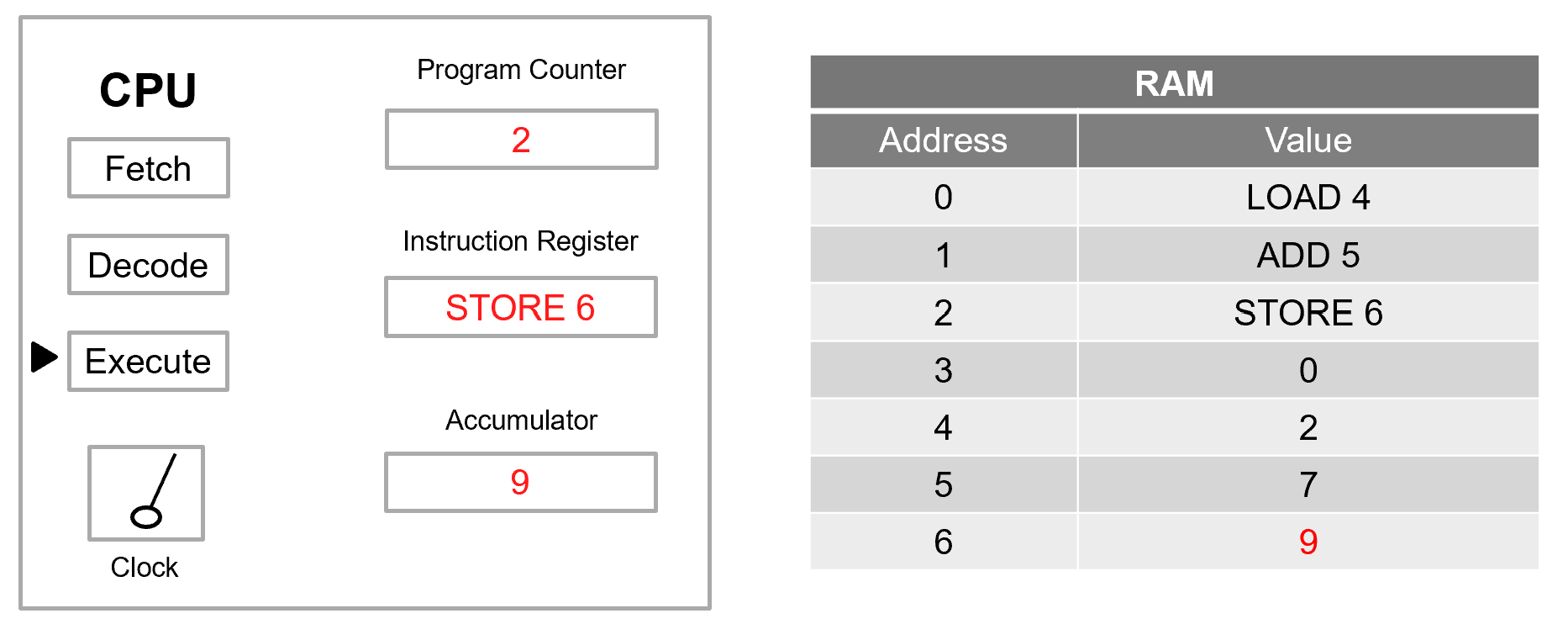
The result of the computation, \(9\), is now stored at address 6.
Conceptual Takeaways#
This example highlights several important principles:
Instructions and data share the same memory.
The Program Counter determines execution order.
The Accumulator holds intermediate results.
Arithmetic occurs inside the processor, not in memory.
Memory only changes when explicitly instructed (e.g.,
STORE).
Even a simple addition requires multiple coordinated hardware steps. Larger programs follow the same pattern — just repeated many millions (or billions) of times per second.
Understanding this small example provides the foundation for analyzing:
Branching instructions
Loop behavior
Instruction timing
Program flow control
Real processor execution models
Example 2 — Comparison of Values#
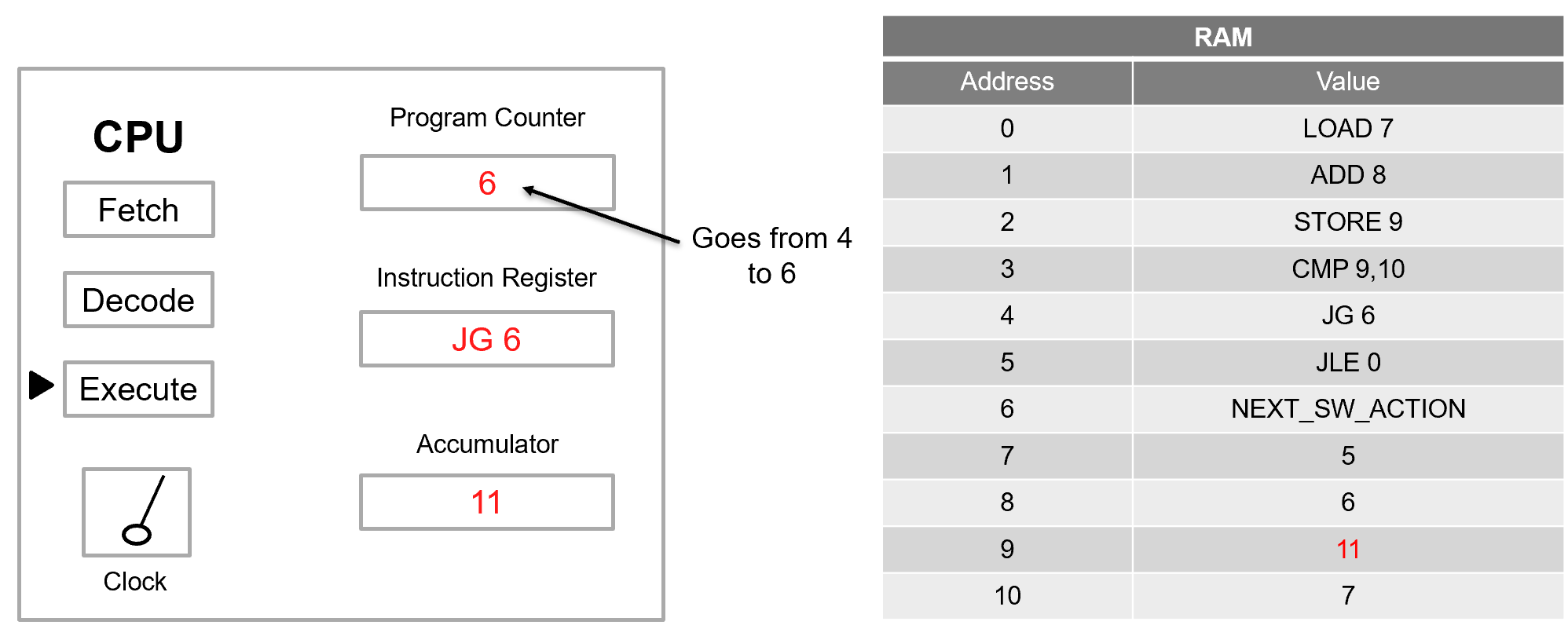
This example expands upon Example 1 by introducing comparison and branching instructions.
Unlike simple arithmetic, this program makes a decision based on the relationship between two values.
The code compares two values and then takes action based on the result:
If the comparison shows the value is equal to or less than, execution jumps back to the start of the program (Address 0).
If the comparison shows the value is greater than, execution continues to the next instruction (Address 6).
This structure introduces conditional branching, a fundamental concept in program control flow.
Initial RAM#
Address |
Value |
|---|---|
0 |
LOAD 7 |
1 |
ADD 8 |
2 |
STORE 9 |
3 |
CMP 9,10 |
4 |
JG 6 |
5 |
JLE 0 |
6 |
NEXT_SW_ACTION |
7 |
5 |
8 |
6 |
9 |
0 |
10 |
7 |
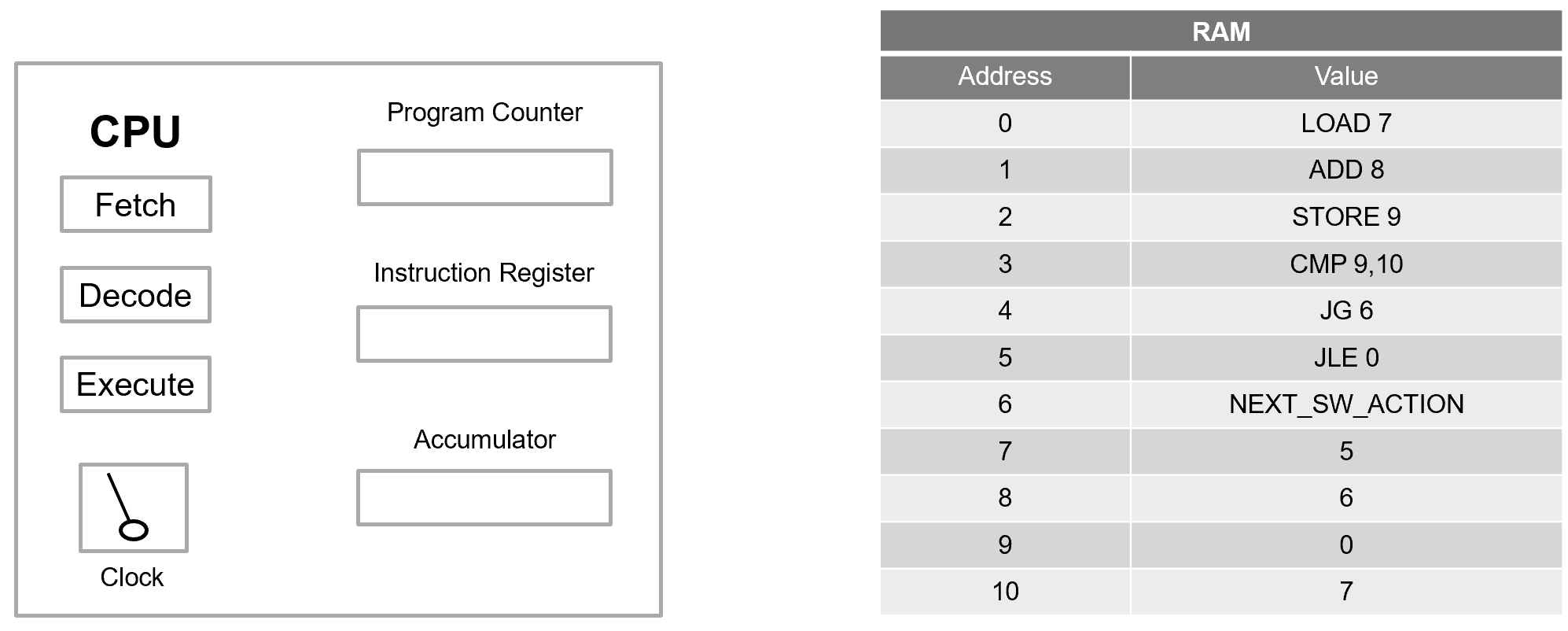
Interpreting the Program#
Let us examine the intent of each instruction.
LOAD 7→ Load the value at address 7 into the accumulator.ADD 8→ Add the value at address 8.STORE 9→ Store the result at address 9.CMP 9,10→ Compare the value at address 9 with the value at address 10.JG 6→ If greater than, jump to address 6.JLE 0→ If less than or equal, jump to address 0.NEXT_SW_ACTION→ Continue execution (beyond scope here).
The data values are:
Address 7 → \(5\)
Address 8 → \(6\)
Address 10 → \(7\)
Step-by-Step Execution#
Step 1: LOAD 7#
The accumulator becomes:
Step 2: ADD 8#
The accumulator updates to:
Step 3: STORE 9#
The result is written to memory:
Memory After STORE 9#
Address |
Value |
|---|---|
0 |
LOAD 7 |
1 |
ADD 8 |
2 |
STORE 9 |
3 |
CMP 9,10 |
4 |
JG 6 |
5 |
JLE 0 |
6 |
NEXT_SW_ACTION |
7 |
5 |
8 |
6 |
9 |
11 |
10 |
7 |
At this point:
Address 9 contains \(11\).
Address 10 contains \(7\).
Step 4: CMP 9,10#
The CMP instruction compares:
Importantly:
The accumulator does not change.
The processor internally subtracts the values.
Status flags are set inside the Control Unit.
Since:
The greater-than flag is set.
Step 5: JG 6#
The instruction JG 6 means:
Jump to address 6 if the greater-than condition is true.
Because \(11 > 7\):
Execution continues at address 6, which contains: NEXT_SW_ACTION
The branch at address 5 (JLE 0) is skipped.

Conceptual Understanding#
This example demonstrates three critical ideas:
Comparison does not modify data directly.
It sets internal condition flags.
Branching modifies the Program Counter.
Control flow is altered by changing the next instruction address.
Control flow enables decision-making.
Programs are no longer strictly sequential.
Without comparison and branching instructions, software would only execute in a straight line.
Conditional jumps enable:
Loops
Decision structures (if/else)
Error handling
Complex program logic
Why This Matters#
Modern software — from operating systems to embedded controllers — depends heavily on conditional execution.
This small example captures the essence of:
Status flag evaluation
Control flow redirection
The relationship between arithmetic and logic operations
Understanding this behavior prepares you to analyze:
Infinite loops
Branch prediction
Program Counter evolution
Real-world processor execution timing
Example 2b — Updated RAM (Loop Case)#
In this variation, a single memory value changes. Compare this case to Example 2.
Address |
Value |
|---|---|
0 |
LOAD 7 |
1 |
ADD 8 |
2 |
STORE 9 |
3 |
CMP 9,10 |
4 |
JG 6 |
5 |
JLE 0 |
6 |
NEXT_SW_ACTION |
7 |
5 |
8 |
1 |
9 |
6 |
10 |
7 |
The key difference is:
Comparing Results#
In Example 2, the arithmetic produced:
In Example 2b, the arithmetic produces:
That result is stored at address 9, so now:
The comparison becomes:
Since:
the less-than-or-equal condition is true.
Branching on “Less Than or Equal to”#
The instruction at address 5 is JLE 0, which means:
If the comparison result is less than or equal, set the Program Counter to 0.
Because the condition is true:
Execution jumps back to the beginning of the program.
The code repeats:
LOAD 7
ADD 8
STORE 9
CMP 9,10
JLE 0
Because the data values do not change, the same arithmetic and comparison occur every time:
The branch condition will always evaluate to true.
Infinite Loop Behavior#
Because there is no instruction that modifies the values at addresses 7, 8, or 10, the comparison outcome never changes.
Therefore:
The Program Counter repeatedly resets to address 0.
Execution never progresses to address 6.
The program has no termination path.
Does this code have an infinite loop? Yes.
Why This Matters#
This example illustrates a critical principle:
A single data value can dramatically alter control flow.
Changing the value at address 8 from 6 to 1 changed the program from a forward-progressing branch to a permanently repeating loop.
In real systems, such behavior can:
Cause software to hang
Freeze embedded controllers
Consume processor resources indefinitely
From a cybersecurity perspective, control-flow manipulation is especially important. Small data modifications, whether accidental or malicious, can:
Redirect execution
Create denial-of-service conditions
Exploit logic flaws
Conceptual Takeaways#
This comparison reinforces several important lessons:
Branch instructions modify the Program Counter, not the data.
Comparison instructions set internal condition flags.
Program behavior depends heavily on stored data.
Control flow is highly sensitive to small changes in memory values.
Even in simplified models, program flow emerges from the interaction between arithmetic results and branch conditions.